A Comprehensive, Privacy-First Online Tool for Blurring and Pixelating Images Directly in Your Browser. Experience fast and secure editing with
Blur faces on photo online using AI-powered automatic detection.
Introduction
In the increasingly digital world where image sharing is ubiquitous, protecting sensitive information within photos has become essential. Whether you are a journalist safeguarding the identity of sources, a parent protecting your children’s privacy, or a business redacting confidential details, BlurVista offers a reliable, fast, and completely private solution for image censorship.
Unlike traditional photo editing tools that require uploads or complex software, BlurVista processes images directly within your web browser. This design guarantees that your photos never leave your device, eliminating risks of data leakage or unauthorized access.
In addition to smooth Gaussian blur effects, BlurVista also provides pixelation styles for specialized redaction needs. You can blur image online instantly for tailored privacy protection.
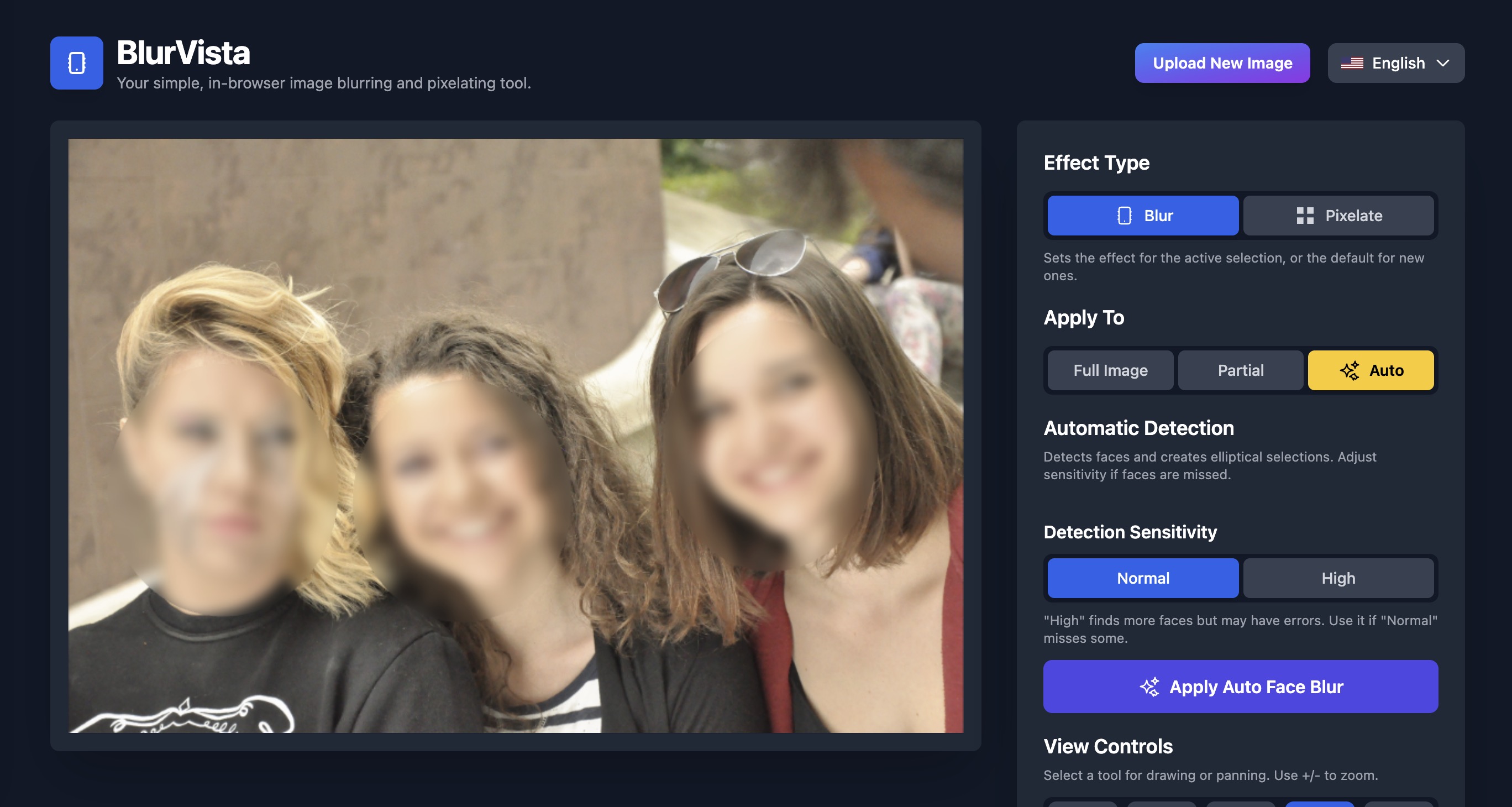
It incorporates AI-driven face detection to automate privacy protection in multi-person photos.
Features
BlurVista's extensive suite of features empowers users with total control over image redaction while ensuring absolute privacy. Key highlights include:
Client-Side Processing for Ultimate Privacy: All operations occur locally in your browser with zero image uploads or server interactions, keeping your data secure and private.
Multiple Censorship Styles: Choose from smooth Gaussian blur for natural softening effects or pixelation for distinct blocky censorship, catering to varied privacy needs.
Application Modes: Apply effects to entire images in one click, focus on selective areas with precise shape tools, or utilize AI-powered automatic face detection for quick multi-face blurring.
Shape-Based Selective Editing: Add and manipulate multiple selection shapes including rectangles, ellipses, and freehand outlines to target exactly which parts of your images to obscure.
Customizable Intensity and Size: Adjust blur density or pixel block size for each selection individually, enabling nuanced control over privacy strength regionally within one image.
Advanced Navigation Tools: Zoom, pan, and fit-to-screen controls allow effortless maneuvering inside images for pixel-perfect editing.
Flexible Export Formats: Download edited images instantly in popular formats including PNG for lossless quality, JPG for smaller file sizes, and modern WEBP with superior compression.
Cross-Platform Compatibility: Runs flawlessly on all mainstream desktop and mobile browsers, removing the need for downloads or registrations, making privacy easy to access anywhere.
AI Face Detection: State-of-the-art browser-based face recognition adapts detection sensitivity for various photo types — from clear portraits to profile or partially obscured faces.
Zero Data Retention: No user images or processing results are saved beyond your session. All data is handled transiently and locally.
How to Use BlurVista
Using BlurVista to protect sensitive image details is straightforward and can be completed in three intuitive steps:
Upload Your Image: Simply drag and drop a photo onto the designated area or use the file selector. Supported image types include PNG, JPG, WEBP, and animated GIFs with a maximum uploaded file size limit of 10MB.
Apply Your Desired Effect: Choose between Gaussian blur and pixelation depending on your needs. Then select an application mode:
Full Image Mode for global censorship;
Partial Mode to manually draw shapes on regions you want blurred or pixelated;
Auto Face Detection Mode for quick automatic detection and blurring of all faces.
Adjust and Download: Fine-tune each selection’s intensity or size. You can move, resize, or delete any selection shape to perfect your edits. Once satisfied, export your image in PNG, JPG, or WEBP formats with instant download — no wait times or server uploads.
The interface supports zoom and pan tools to help work precisely even on detailed or high-resolution images.
Use Cases
BlurVista caters to a wide audience and multiple industries requiring privacy-conscious image handling:
Journalism and Reporting: Protect source identities and sensitive visual information in investigative photo documentation without risking leaks.
Parents and Families: Blur children’s faces before sharing photos on social media or public platforms to maintain privacy.
Corporate and Human Resources: Anonymize employee information and personnel images in internal documents and presentations.
Real Estate and Transportation: Hide license plates, property details, and faces in promotional photos or listings.
Healthcare and Research: Obscure patient information in clinical images or research materials to comply with HIPAA and GDPR regulations.
Legal and Law Enforcement: Redact identities and sensitive details in evidentiary photographs for ethical case handling.
Content Creators and Social Media: Ensure privacy in thumbnails, posts, and public profiles by selectively blurring images before sharing.
Retail and E-Commerce: Mask sensitive branding details or client information in user-submitted photos and marketing campaigns.
By providing a flexible, privacy-first tool, BlurVista empowers users from diverse backgrounds to protect sensitive image content confidently and legally.
Technical Architecture
BlurVista is designed using modern web technologies that enable privacy-first, fully client-side image processing:
Browser-Based Canvas API: All image editing is done using HTML5 Canvas, facilitating real-time rendering and manipulation without server dependency.
WebAssembly & AI Models: Face detection relies on lightweight AI models optimized to run efficiently in browsers via WebAssembly or JavaScript, allowing for privacy-conscious automated facial feature identification.
State Management: The editor maintains selections and effect parameters entirely within local session memory to enable continuous instant feedback without persistent storage.
Export Optimization: Image exports utilize compression libraries supporting PNG, JPG, and WEBP standards, balancing quality and file size per user needs.
Compatibility: Designed to work across all major web browsers (Chrome, Firefox, Safari, Edge) and adapt responsively to desktop or mobile devices.
Security Considerations: No external scripts or third-party tracking integrated, adhering fully to privacy regulations such as GDPR.
Privacy & Security
Protecting users' sensitive visual data is BlurVista's foundational commitment:
No images or data are ever uploaded to servers, ensuring zero exposure risk beyond your device.
No user accounts or personal information are collected, eliminating tracking and profiling vectors.
Temporary data is held only during the editing session and discarded thereafter.
All AI computations for face detection run locally inside the browser, avoiding external transmission of biometric data.
Open-source transparency allows users to verify privacy claims and trust the application’s security model.
This unmatched privacy focus makes BlurVista ideal for users with stringent data protection requirements.
Frequently Asked Questions
Are my photos uploaded anywhere?
No. All editing happens locally on your device within your browser. Your images never leave your device which ensures complete privacy.
Can I blur multiple faces at once?
Yes, BlurVista features automatic AI-based face detection that instantly identifies and blurs all faces in a photo with customizable sensitivity.
What image formats are supported?
You can upload images in PNG, JPG, WEBP, and GIF formats up to 10MB in size. Edited images can be downloaded in PNG, JPG, or WEBP formats.
Is BlurVista free to use?
Yes, BlurVista is 100% free with no subscriptions, hidden fees, or premium tiers. Use it anytime without limits or account registration.
Is BlurVista secure and private?
Absolutely. All image processing occurs directly in your browser. BlurVista does not upload, store, or share your images or data with any servers or third parties.
Can I customize blur intensity or pixelation size?
Yes. Each blur or pixelate selection lets you adjust the intensity or pixel size individually for precision privacy control.
Does BlurVista work on mobile devices?
Yes, BlurVista runs smoothly on all modern mobile and desktop browsers - no installations or downloads required.
Can I edit multiple areas on an image?
Yes. You can create multiple shapes for selective blurring or pixelation, move and resize them independently, offering fine-grained editing.
License
BlurVista is an open-source project dedicated to providing free, accessible, privacy-preserving image censorship tools for everyone.
You are free to use, modify, and distribute the software under the terms specified in the LICENSE file available in the project repository.